
Are You Managing Orders Like This in Group Chat?
One group. Dozens of orders, jobs or customer enquiries. When something changes, somebody scrolls backwards, finds the last message about that order, and replies to it.
If that sounds familiar, your team may already be running a repeatable operational process — the workflow is just hidden inside the conversation.
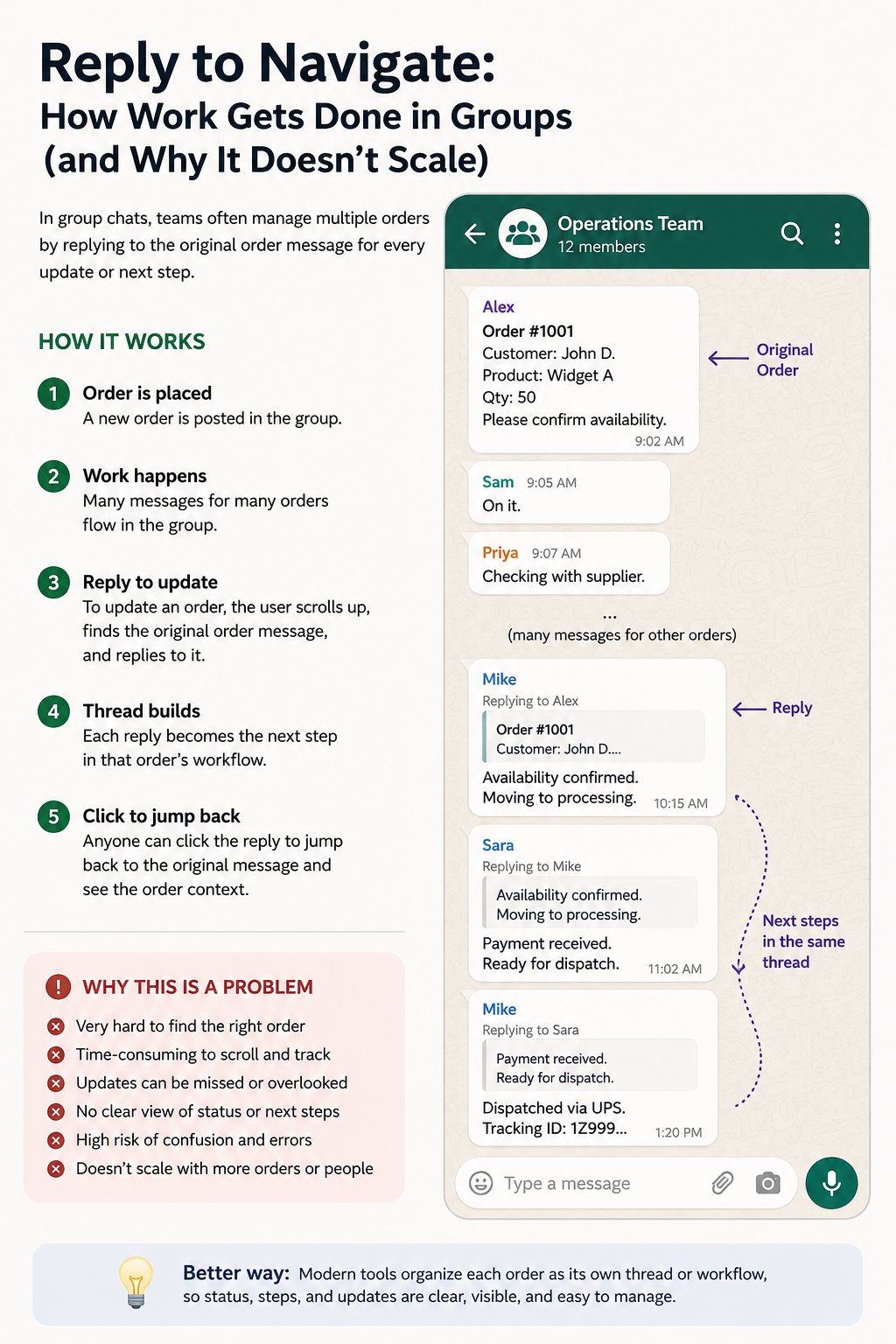
A familiar pattern: the reply feature becomes an improvised way to connect the next stage of an order to its previous update.
Does your team do this?
The Reply Button Quietly Becomes Your Workflow System
Group chat is convenient, so teams naturally start using it for real work. A new order is posted. People discuss it. Someone completes a step. Then they find the previous message about that order and reply to it with the next update.
The same thing happens again at the next stage. Eventually, the history of one job is spread across a chain of replies buried among messages about every other job.
Why this breaks down
Chat Stores the Conversation. It Does Not Store the Current State of the Business Process.
There is nothing inherently wrong with discussing work in a group chat. The problem begins when the conversation itself becomes the system used to track orders, jobs, enquiries or cases as they move through several stages.
The status is buried
The latest state of 30 orders might exist somewhere inside hundreds of messages. There is no clean list of what is waiting, processing or completed.
The next person can miss it
Completing one step does not guarantee that the person responsible for the next step sees the message or acts on it.
Every status check costs time
“Where is Order 1001?” can trigger searching, scrolling, reading old replies and asking coworkers before anyone has an answer.
Old work quietly disappears
New messages keep pushing older jobs upward. Something that needs attention can become invisible simply because nobody mentioned it recently.
The process lives in people's heads
Employees have to remember what comes after approval, production, dispatch, verification or whatever stage applies to that job.
More work means more confusion
The method can feel perfectly manageable with a handful of jobs. The weakness appears when the number of simultaneous jobs grows.
The missing piece
You Should Not Have to Reconstruct an Order Every Time You Open It
For work that moves through stages, the useful information is not simply everything everybody has ever said.
What matters right now is much simpler:
The history is a trail of messages
Find the order. Find its latest reply. Work backwards through the conversation. Decide which update is current. Then figure out what should happen next.
The job has a current state
Open the order and see its present stage, previous updates, owner, completed work and next action together.
A better structure
Let the Order Move Through Defined Process Steps
Instead of making employees use replies to connect one update to another, the order itself can move through a defined operational workflow.
Each business can use its own stages. The important change is that the workflow is explicit instead of being reconstructed from a chain of messages.
How It Should Look
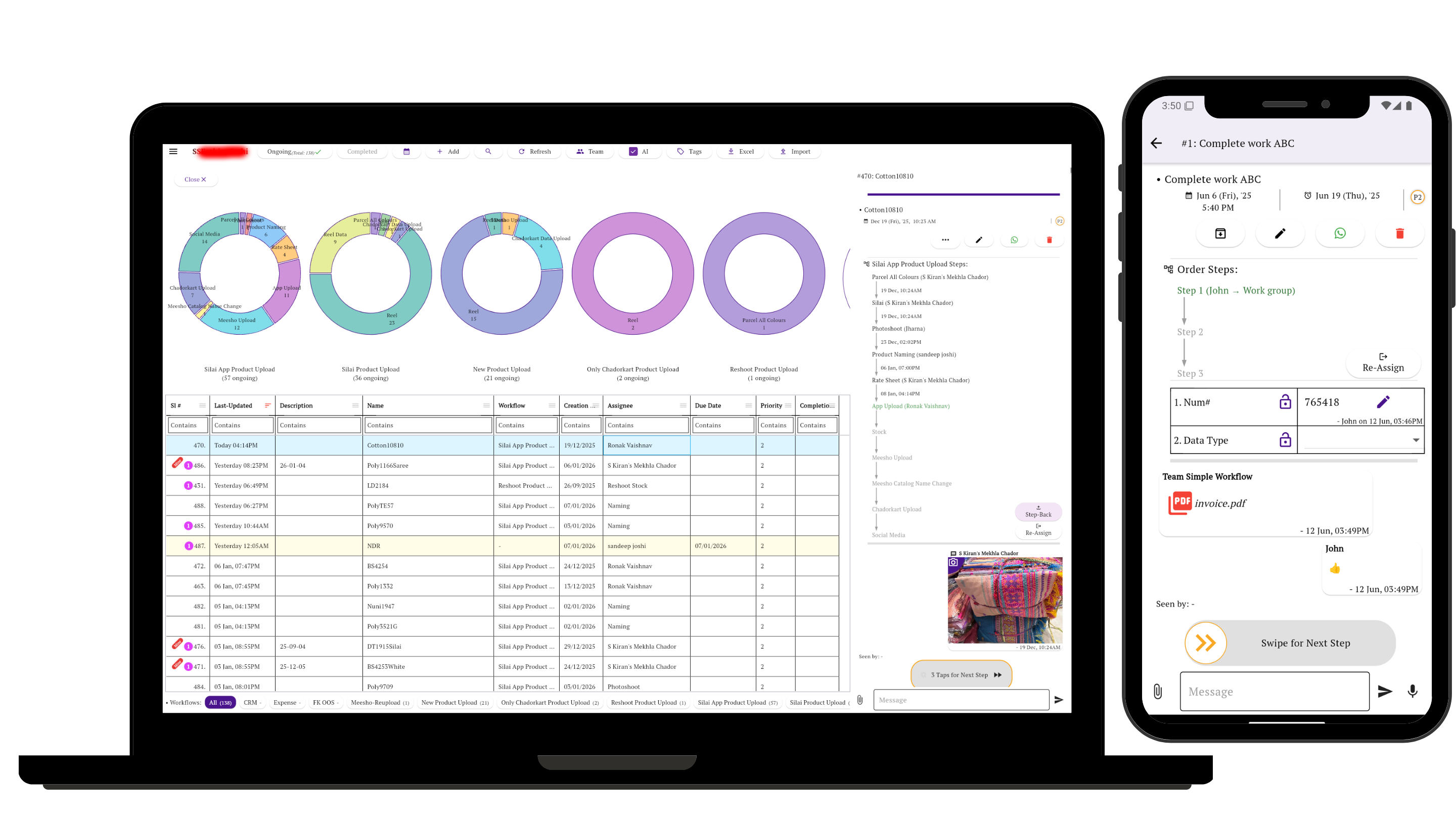
Each order stays visible as its own piece of work, with the current stage, responsible person, supporting information and next action in one place.
- Every order remains individually visible even when nobody has messaged about it recently.
- The current stage can be seen without reading the entire conversation.
- The person responsible for the next step can be explicit.
- Previous updates, documents and discussions remain attached to that piece of work.
- Managers can see pending work across many orders instead of checking them one by one.
Simple Workflow
Keep the Conversation. Stop Using the Conversation as the Workflow.
In Simple Workflow, an order, job, enquiry, case or request can become its own task. The messages stay around that task, while ownership and workflow stages tell the team where the work actually stands.
- One place for each order or job
- Conversation attached to the work
- Defined process steps and workflow stages
- Clear ownership and next action
- Photos, PDFs, forms and other supporting information
- Mobile execution with laptop visibility
The simple test
If You Have to Scroll Backward to Move Work Forward, Chat Has Become Your Workflow System.
Group chat can still be useful for conversation. But when orders repeatedly move through people, stages, approvals or checks, the work itself deserves a place where its current state is visible.
Explore the problem further
Related Guides
Frequently asked questions
Tracking Orders in Group Chat: FAQs
Can a group chat be used to track orders?
It can work for a very small number of orders, especially when one or two people are involved. It becomes difficult as more orders, employees and workflow stages share the same conversation because the current state of each order is buried among messages.
Why do teams reply to old messages when managing work in chat?
Replying to an earlier message gives the new update some context and lets people jump back to the previous message. Teams can therefore create an informal chain of updates for each order even though many different orders share the same group.
What is a reply-chain workflow?
Reply-chain workflow is our term for the informal practice of tracking a piece of work by repeatedly replying to its previous message as it moves through stages. The replies create a loose history, but the current status and next action remain difficult to see across many simultaneous jobs.
What is better than using group chat for order tracking?
For repeatable operational work, process tracking gives each order or job its own record with a current stage, responsible person, updates and history. Chat can still be part of that record rather than being the only place where the workflow exists.
Do small teams really need workflow software?
Not every small team does. Workflow software becomes useful when several active jobs repeatedly move through different people, stages, checks or approvals and the team spends time searching for status or coordinating the next handoff.