
How 200 Small Teams Actually Manage Their Work
We reviewed a sample of 200 Simple Workflow customer accounts to understand what small operational teams actually manage every day: how large the teams are, what their tasks represent, how often work repeats, and how much business process structure sits behind seemingly simple day-to-day operations.
What We Found Across the Sample
The clearest pattern was not that small teams have simple work. Relatively small teams often run repeatable business processes with multiple operational steps.
| Finding | What we observed | What it suggests |
|---|---|---|
| 6 members | Median team size in the sampled accounts. | Operational workflow is not only a large-enterprise problem. |
| 94% | Had 20 or fewer team members. | The sample is overwhelmingly made up of small teams. |
| 64% | Had at least one prominent multi-step workflow recorded in the exported sample. | Defined process structure is common even with a small headcount. |
| 5 steps | Median length across about 280 recorded multi-step workflows. | A typical workflow contains several stages or handoffs, not just a checkbox. |
| 32% | Repeated the same task title within only their latest 10 tasks, ignoring capitalization. | Recurring operational work is a substantial part of day-to-day usage. |
What we analyzed
The sample included team size, the latest 10 task titles, and up to three prominent workflows for each account. We analyzed the data in aggregate. Customer names, account identifiers, phone numbers and identifiable task details are not published here.
The goal was not to survey what businesses say they do. It was to look at the way real teams have structured day-to-day operations inside Simple Workflow.
Figures are rounded for readability and account confidentiality. Workflow-step analysis excludes entries explicitly recorded without defined steps. This is a product-usage sample and should not be treated as a statistically representative survey of every small business.
We plan to refresh this analysis periodically as the sample grows, so future editions can show whether these usage patterns remain stable or change over time.
Small Teams Still Run Real Processes
The median sampled team had only 6 members, and 94% had 20 or fewer. Yet the workflow data was not simple in the sense of “one person gets a to-do and checks it off.”
Nearly two-thirds of the sampled accounts had at least one prominent multi-step workflow captured in the data. Across about 280 recorded multi-step workflows, the median workflow had 5 defined steps, and about 28% had 8 or more.
What surprised us: a small headcount does not imply a simple process. A six-person business may still have work moving through intake, checking, approval, production, dispatch and payment.
Percentages are rounded from the anonymized August 2026 sample.
A “Task” Often Represents the Work Itself
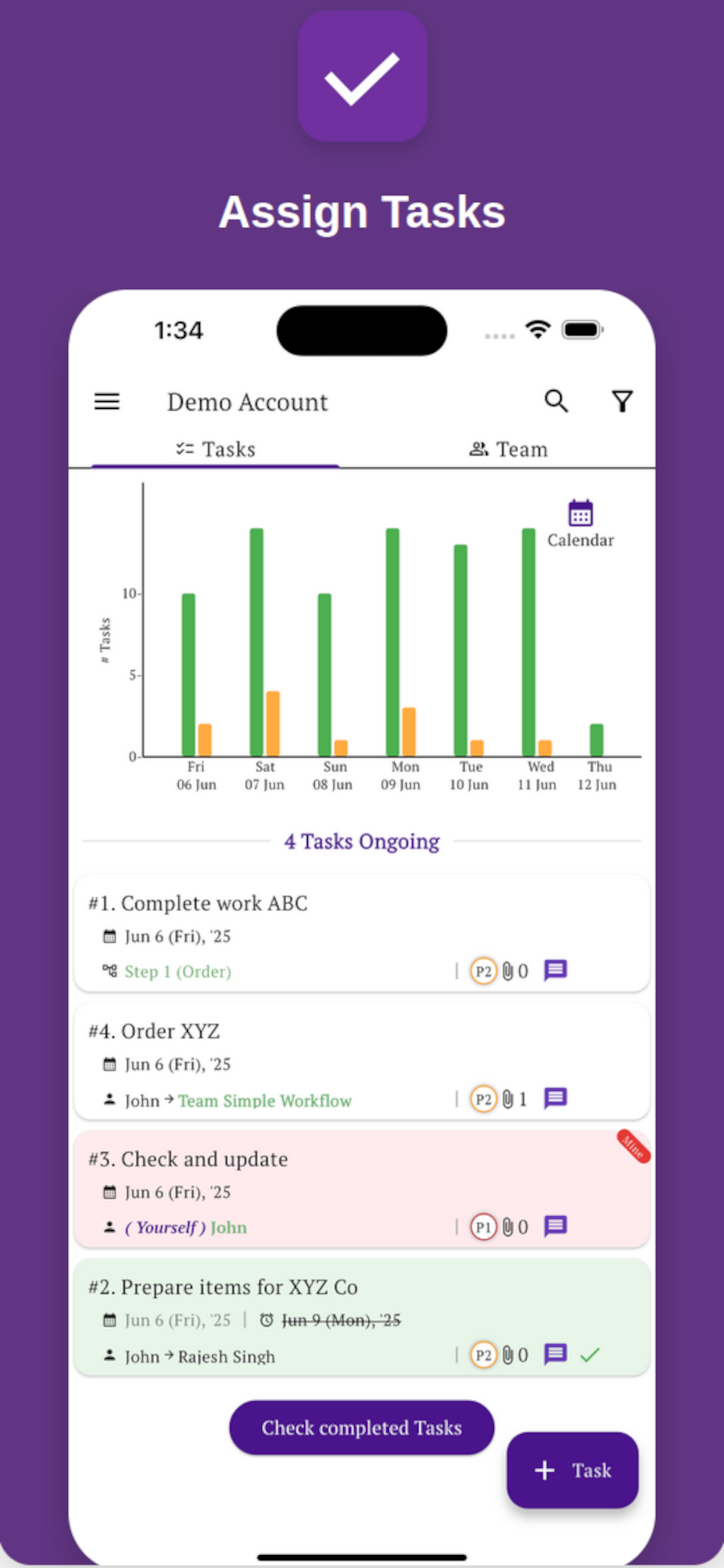
A striking pattern in the task titles was that many did not look like traditional personal to-do items. Instead, the task often represented the real-world object moving through the business.
This is why we think of operational task management differently from project planning: the task is often the workspace around an order, job, customer, case or request. Messages, documents, ownership, workflow steps and structured information belong around that piece of work.
Operational Work Follows Repeatable Processes
In about 32% of sampled accounts, the same task title appeared more than once within only the latest 10 tasks when differences in capitalization were ignored.
That is a deliberately conservative measure: it counts repeated titles after normalizing capitalization, not merely tasks that look similar. It still shows how often small teams deal with recurring activity rather than a stream of unrelated projects.
Daily reports, recurring follow-ups, repeated production jobs, standard service work and routine processing all appeared in the sample. These are examples of repeatable business processes rather than isolated projects.
For recurring work, the useful question is often not “Which project is this in?” but “Where is this job now, who owns it, and what happens next?”
When those answers are not visible, managers often recreate them through messages and meetings.
Different Businesses Use Similar Process Steps and Workflow Mechanics
The industries and task names vary, but the underlying movement of work frequently follows a familiar pattern.
Not every workflow uses every stage, and the labels differ by industry. But handoffs, checking, approval, delivery and closure appeared repeatedly across very different kinds of work. See the print shop workflow examples from the sampled accounts, the wholesale and distribution workflow examples, and the field service workflow examples for installations, visits and maintenance for closer looks at how different industries apply those stages.
Structure Matters Most at the Handoff
Small teams often know each other well. That can make informal coordination feel sufficient — until a job moves from one person to another, waits for approval, needs proof, or gets delayed.
The workflow sample repeatedly contained explicit checking, verification, approvals, testing, dispatch, handover and completion stages. Those are the points where ownership and history matter.
The useful structure is therefore not necessarily a deep project hierarchy. It is a clear answer to: who has the work now, what has already happened, and what is the next step? That visible current state helps managers stop chasing their team for status updates.
For the operational symptoms behind that need, see seven common small business workflow problems and practical fixes.
See how this works in workflow and process management with steps, stages and approvals.
Software for Small Teams Should Be Simple at the Surface, Structured Underneath
The data points toward four practical design requirements for operational teams.
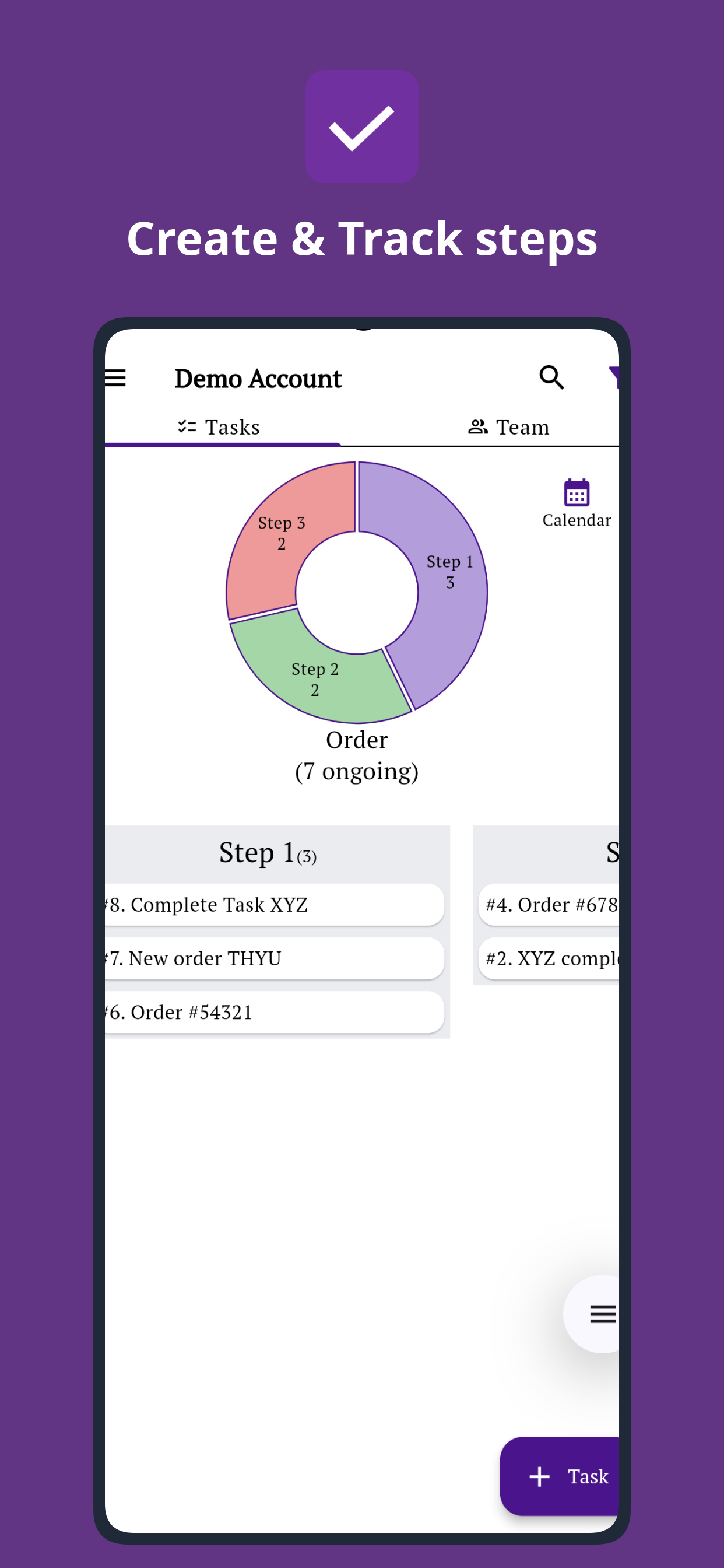
People should be able to open the app and immediately see the work relevant to them.
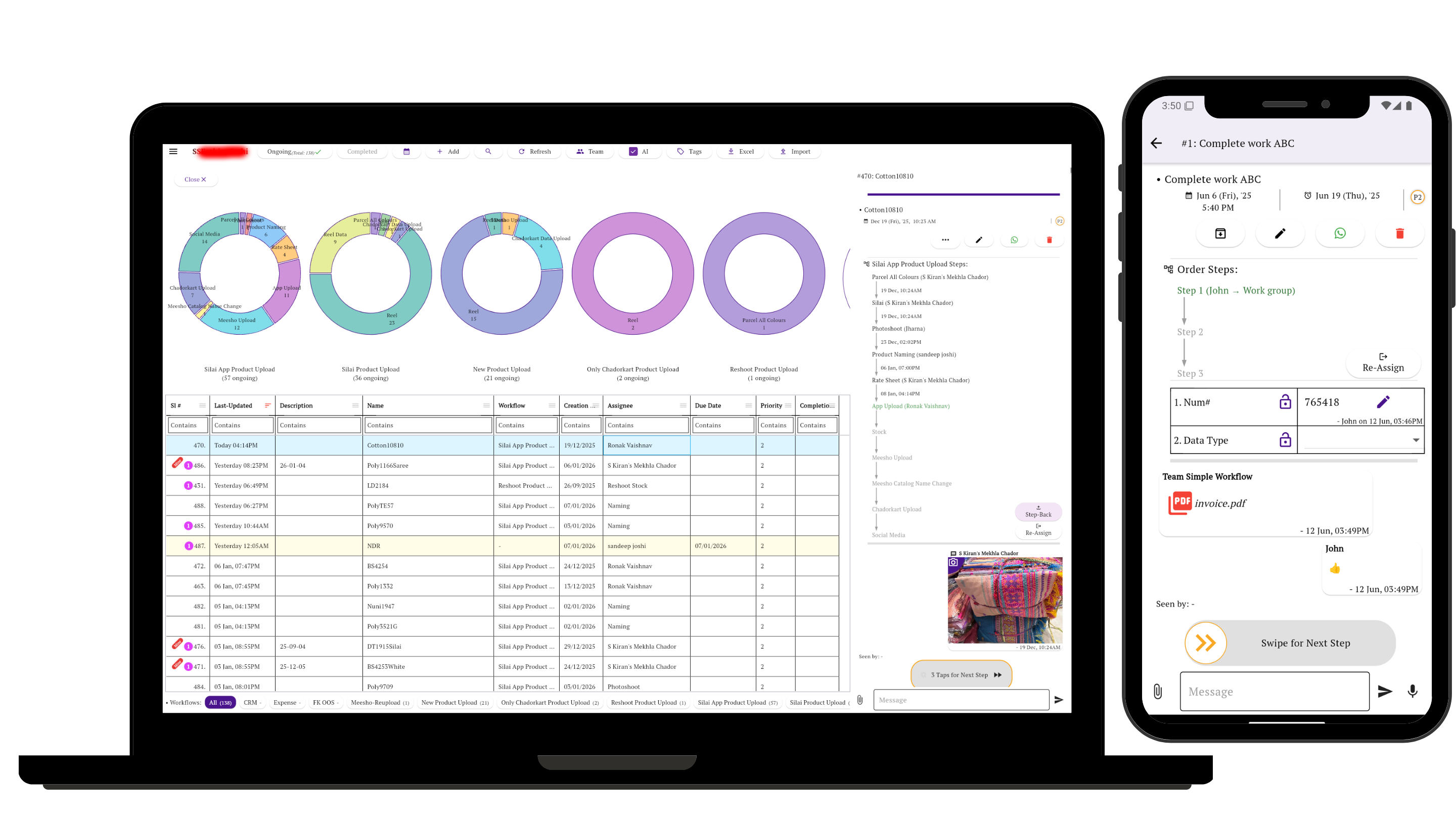
Updates, photos, PDFs, ownership and useful data should stay attached to the job or case.
When work changes hands, the next owner and next step should be clear without another coordination layer.
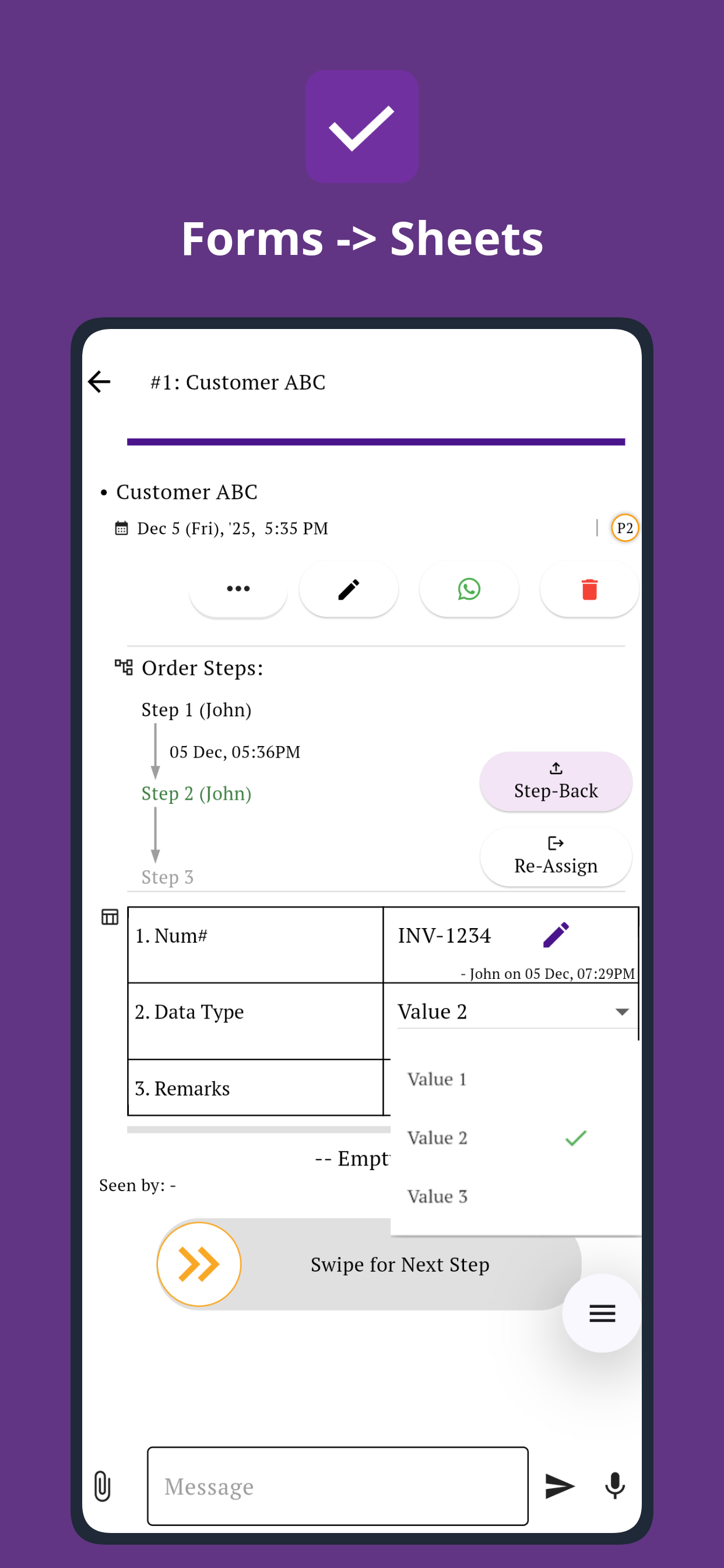
Ad-hoc work can stay simple; repeatable work can use steps, forms, checks and approvals.
The Task Becomes the Working Record
The research reinforces a pattern we see in product usage: a useful operational task is more than a title and checkbox.
It may need a conversation, an owner, a document, a photograph, a workflow stage, a customer or invoice number, and a history of how the work moved through the team.
Simple Workflow keeps those things around the task while avoiding the need for every employee to navigate a large project-management hierarchy.
Read more about simple task management without project-management clutter.
Related Guides
Questions About the 200-Team Sample
What data was included in the analysis?
The analysis used team size, the latest 10 task titles, and up to three prominent workflows from each sampled Simple Workflow account. Customer-identifying information is not published.
Does a small team really need workflow software?
Not every small team does. But the sample shows that small teams can still run multi-step operational processes involving handoffs, checking, approvals, documents, delivery and closure.
What is the difference between a task and a workflow or business process?
A task is the individual piece of work — such as an order, job, case or request. A workflow or business process defines the repeatable stages that a task moves through when several steps or people are involved.
Are these results representative of every small business?
No. This is an anonymized product-usage sample from Simple Workflow customers, not a population-wide survey. It is useful for observing real usage patterns, not for estimating how every small business operates.
Small Team Does Not Mean Simple Work
With Simple Workflow, give people a simple place to see and update their work, while keeping the workflow, ownership, documents and history the business needs underneath.